FAQ
What files can I use?
You can upload a .docx file or choose a Google Doc.
Which languages are available?
Over 70, listed below. You can choose several languages and a different number of copies for each one.
 Hindi
Hindi Simplified Chinese
 Spanish
 Traditional Chinese
 French
 Arabic
 Bengali
 Portuguese
 Russian
 Urdu
Urdu Indonesian
 Punjabi (Gurmukhi script)
 German
 Japanese
 Telugu
 Marathi
 Turkish
 Tamil
Tamil Vietnamese
 Korean
 Swahili
 Italian
 Gujarati
 Yoruba
 Polish
 Kannada
 Ukrainian
 Malayalam
 Persian (Farsi)
 Malay
Malay Azerbaijani
 Romanian
 Dutch
Dutch Hungarian
 Czech
Czech Greek
Greek Swedish
 Thai
Thai Nepali
 Kazakh
 Sinhala
 Filipino (Tagalog)
 Amharic
 Somali
 Burmese
 Hebrew
 Finnish
 Danish
 Norwegian
 Croatian
 Slovak
 Serbian
 Bulgarian
 Georgian
 Armenian
 Pashto
 Khmer
Khmer Lao
Lao Haitian Creole
 Igbo
Igbo Akan (Twi)
 Cebuano
 Ilocano
 Hmong
Hmong Tigrinya
 Yiddish
 Mongolian (Cyrillic script)
 Albanian
 Bosnian
 Samoan
 Navajo (Diné)
How do copy counts work?
Enter how many copies you need in each language. The combined PDF repeats each worksheet that many times, so you can print it all at once. For example, the settings below give you one copy in Simplified Chinese, two in Traditional Chinese, and four in Spanish.

Save a preset for each class to reuse its languages and copy counts. Your most recent settings are saved as Default automatically.
Will the translated worksheet keep its layout?
I try to preserve tables, math, answer space, and supported figures. Translation changes text length, so the result may use more pages or need adjustment. Use Report a problem on the results page if the layout does not work.
How good are the translations?
Very good! Commonly spoken languages such as Spanish, Chinese, Hindi, Arabic, French, etc. have excellent quality, but you're likely to get good results even in less-represented languages like Mongolian.
Should I review the translations?
Yes, if you can. They can still contain mistakes.
How does the translation work?
I use a large language model (LLM) to translate each worksheet. Read more about them on Wikipedia. It uses the surrounding text to help translate words in context.
What's a "term sheet"?
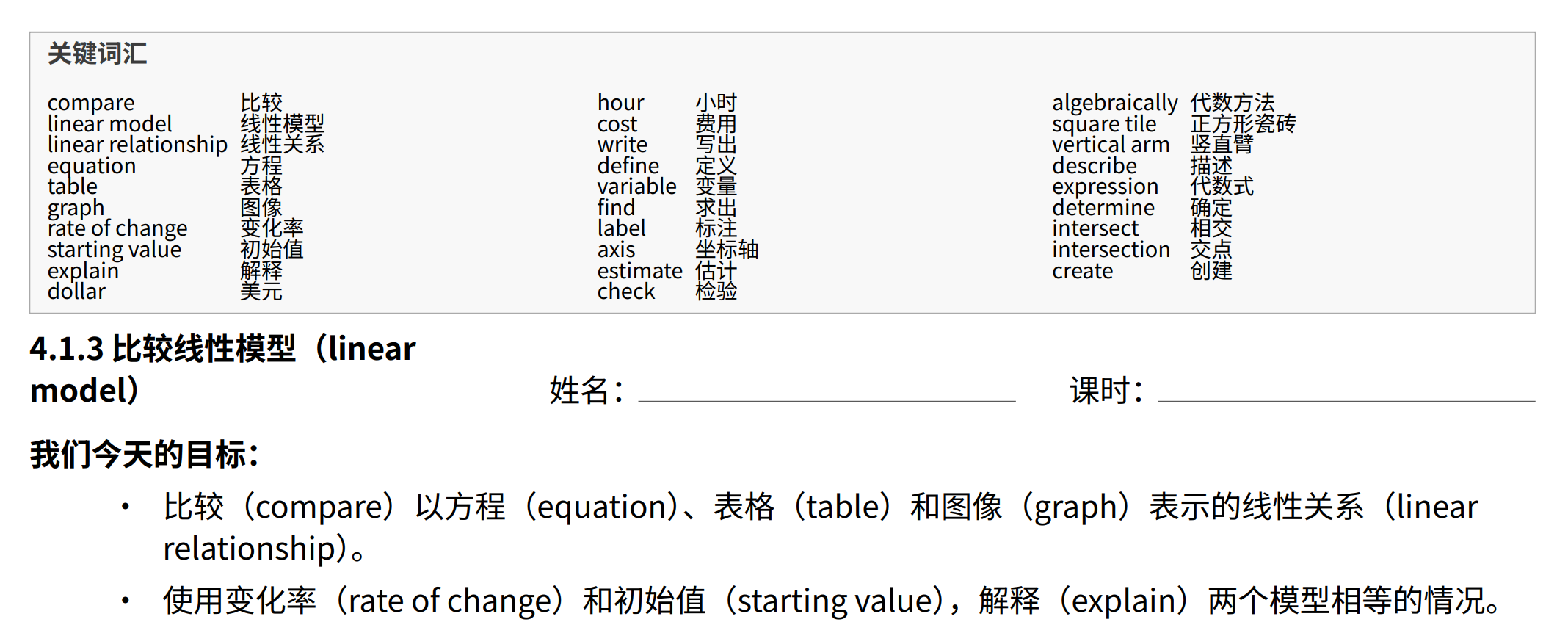
Polycopies picks out key terms and puts them in a bilingual table at the top of the worksheet. It can also add the English terms in parentheses throughout the text, as shown below. I've found this helpful for students writing answers and learning vocabulary. Seeing the words repeatedly can help them learn English vocabulary. You can turn either option off when creating a worksheet.
Why does the translated worksheet look different?
Translated text takes up a different amount of space, and some languages read from right to left. Polycopies rebuilds the layout to fit the translated text, including math and tables.
Some layouts still need work. Use Report a problem on the results page if yours comes out wrong.